这个章节将展示如何在SpringBoot应用程序上执行引导。
Spring Initializer
通过使用Spring Initializer来引导出初始化一个SpringBoot应用,首先,你需要访问Spring Initializer 网页https://start.spring.io/并且选择适合的Build,Spring Boot Version和Platform,然后你需要提供Group,Aritfact和运行用所需要的依赖。点击Generate Project按钮,就会下载初始化项目压缩包。
接下来将使用Maven来展示案例: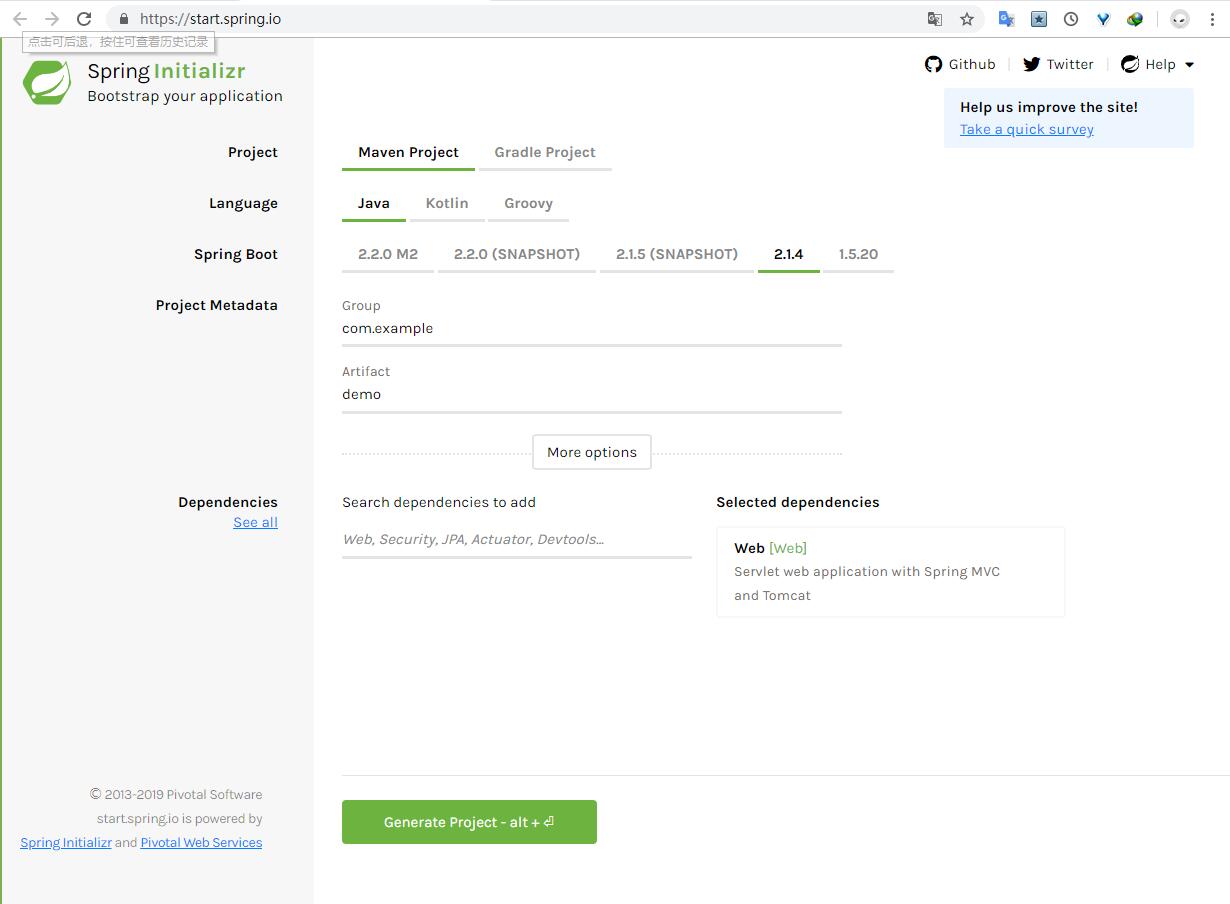
Maven
下好整个项目后,解压包,你会看到如下pom.xml:1
2
3
4
5
6
7
8
9
10
11
12
13
14
15
16
17
18
19
20
21
22
23
24
25
26
27
28
29
30
31
32
33
34
35
36
37
38
39
40
41
42
43
44
45
46
47
48
49
50
51
<project xmlns = "http://maven.apache.org/POM/4.0.0"
xmlns:xsi = "http://www.w3.org/2001/XMLSchema-instance"
xsi:schemaLocation = "http://maven.apache.org/POM/4.0.0
http://maven.apache.org/xsd/maven-4.0.0.xsd">
<modelVersion>4.0.0</modelVersion>
<groupId>com.tutorialspoint</groupId>
<artifactId>demo</artifactId>
<version>0.0.1-SNAPSHOT</version>
<packaging>jar</packaging>
<name>demo</name>
<description>Demo project for Spring Boot</description>
<parent>
<groupId>org.springframework.boot</groupId>
<artifactId>spring-boot-starter-parent</artifactId>
<version>1.5.8.RELEASE</version>
<relativePath/> <!-- lookup parent from repository -->
</parent>
<properties>
<project.build.sourceEncoding>UTF-8</project.build.sourceEncoding>
<project.reporting.outputEncoding>UTF-8</project.reporting.outputEncoding>
<java.version>1.8</java.version>
</properties>
<dependencies>
<dependency>
<groupId>org.springframework.boot</groupId>
<artifactId>spring-boot-starter-web</artifactId>
</dependency>
<dependency>
<groupId>org.springframework.boot</groupId>
<artifactId>spring-boot-starter-test</artifactId>
<scope>test</scope>
</dependency>
</dependencies>
<build>
<plugins>
<plugin>
<groupId>org.springframework.boot</groupId>
<artifactId>spring-boot-maven-plugin</artifactId>
</plugin>
</plugins>
</build>
</project>
Class Path Dependencies
Spring Boot 提供了一系列Stater来添加依赖的jar包到我们的类路径中,例如,为了编写Rest端点,我们需要在类路径中添加spring-boot-starter-web依赖项,格式如下:1
2
3
4
5
6<dependencies>
<dependency>
<groupId>org.springframework.boot</groupId>
<artifactId>spring-boot-starter-web</artifactId>
</dependency>
</dependencies>
Main Method
Spring Boot 应用程序需要包括主程序类,这个类应该被注解为@SpringBootApplication,作为整个应用程序的入口点,在已经初始化好的项目中能够找到这个类已被生成到src/java/main目录下。代码如下:1
2
3
4
5
6
7
8
9import org.springframework.boot.SpringApplication;
import org.springframework.boot.autoconfigure.SpringBootApplication;
public class DemoApplication {
public static void main(String[] args) {
SpringApplication.run(DemoApplication.class, args);
}
}
创建一个Rest Endpoint
通过Spring Boot主程序类创建一个简单的Rest端点(即Rest服务提供类),按如下步骤:
- 首先,在类上面添加@RestController注解
- 然后,使用@RequestMapping注解来指定一个请求uri
- 其次,这个被指定函数需要返回一个“Hello World”字符串
现在,你的SpringBoot主程序类如下:1
2
3
4
5
6
7
8
9
10
11
12
13
14
15
16
17import org.springframework.boot.SpringApplication;
import org.springframework.boot.autoconfigure.SpringBootApplication;
import org.springframework.web.bind.annotation.RequestMapping;
import org.springframework.web.bind.annotation.RestController;
public class DemoApplication {
public static void main(String[] args) {
SpringApplication.run(DemoApplication.class, args);
}
(value = "/")
public String hello() {
return "Hello World";
}
}
创建一个可执行JAR
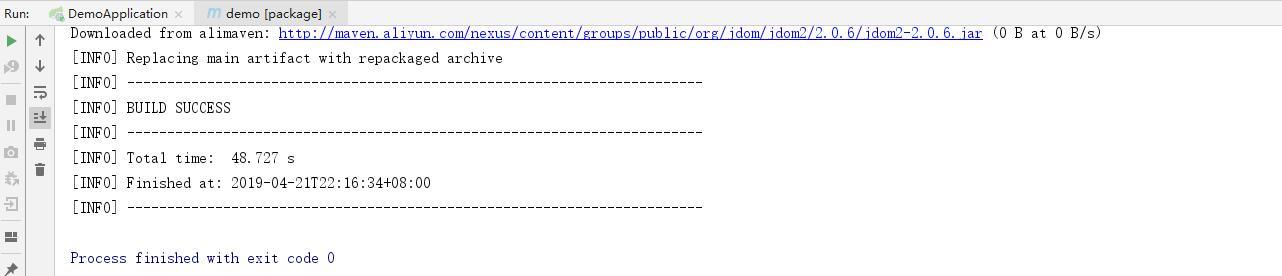
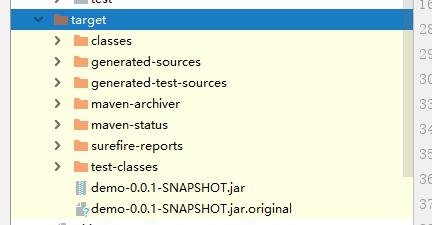
让我们创建一个可执行jar包,通过idea自带的maven工具来生成jar包,如下: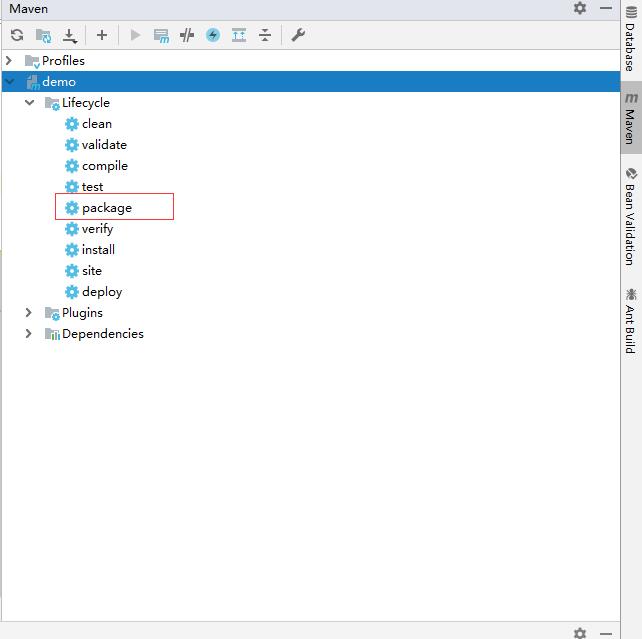
Run Hello world with Java
通过java -jar xxx.jar执行jar包并在浏览器8080端口中可查看到Hello World


评论加载中