TCB 云开发与传统应用架构的区别
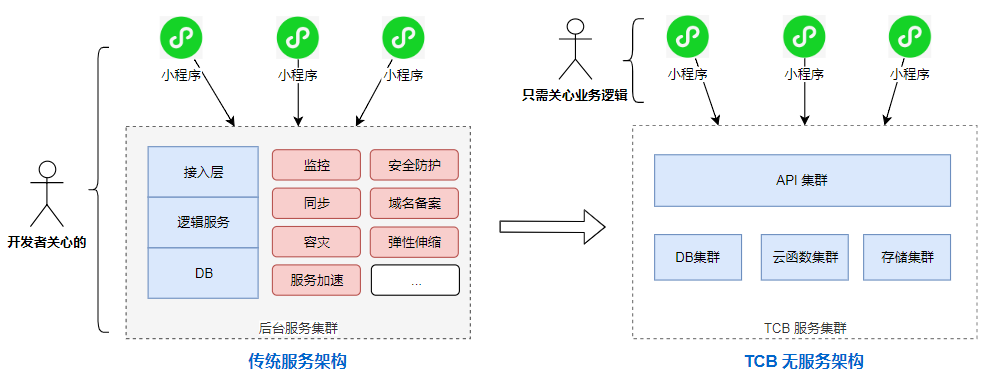
导读
云开发的服务,可以在哪些端被调用?不同端会有哪些的调用能力的不同?
可以在小程序端和服务端调用。小程序端是通过内置的接口调用。而服务端,这里包括原有的服务和云函数,可以通过 wx-server-sdk 或者 tcb-admin-node 其中一个 node sdk 进行调用,前者是基于后者进行二次开发的。如果希望开发体验与小程序端一致,可采用 wx-server-sdk。小程序端的调用由于安全问题,会由较多的限制,而在服务端,则是可拥有管理员的权限(所以你会发现 tcb-admin-node 带有 admin 字眼,表示具有管理员权限)。
云函数的创建和依赖安装
在 project.config.json 文件里,要添加以下字段,指向云函数的根目录。
1
2
3
{
"cloudfunctionRoot": "./server/functions/"
}
那意味着,如果我们想建一个叫 test 的云函数,需要在 ./server/functions 这个目录里新建 test 目录 ,并且要在 test 里安装依赖。千万不要在根目录安装依赖!
云函数可以互相调用吗?
可以的,在 A 云函数里面,执行以下的语句就可以调用 B 云函数了,跟小程序端调用其实是一样的
1
2
3
4
5
6
7
8
9
10
11
12
13
const cloud = require('wx-server-sdk');
exports.main = async (event, context) => {
const res = await cloud.callFunction({
// 要调用的云函数名称
name: 'B',
// 传递给云函数的参数
data: {
x: 1,
y: 2,
}
})
return res.result;
}在小程序端,如何使用 async/await 语法?
在云函数里,由于 Node 版本最低是 8.9,因此是天然支持 async/await 语法的。而在小程序端则不然。在微信开发者工具里,以及 Android 端手机(浏览器内核是 QQ浏览器的 X5),async/await是天然支持的,但 iOS 端手机在较低版本则不支持,因此需要引入额外的 polyfill。可把这个 polyfill 文件引用到有使用 async/await 的文件当中。
官方文档解读
- 云开发三大基础能力支持:
- 云函数:在云端运行的代码,微信私有协议天然鉴权,开发者只需编写自身业务逻辑代码
- 数据库:一个既可在小程序前端操作,也能在云函数中读写的 JSON 数据库
- 存储:在小程序前端直接上传/下载云端文件,在云开发控制台可视化管理
云开发QuickStart demo初步学习
基本项目结构
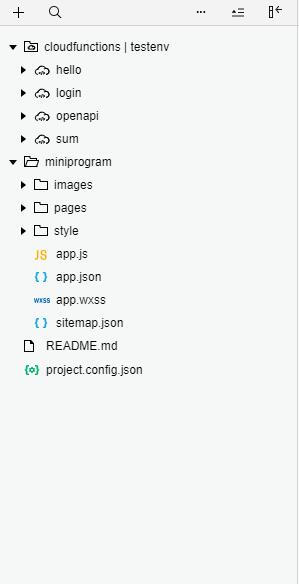
小程序端云开发
小程序onLanuch的时候需要调用
wx.cloud.init方法,如下:1
2
3
4
5
6
7
8
9
10
11
12
13
14
15
16
17
18//app.js
App({
onLaunch: function () {
if (!wx.cloud) {
console.error('请使用 2.2.3 或以上的基础库以使用云能力')
} else {
wx.cloud.init({
env:'testenv-6a6b5e',//这个指定自己的开发环境id(云开发提供两个环境)
traceUser: true,
})
}
this.globalData = {}
}
})
2. 获取用户openidonGetOpenid: function() {
// 调用云函数
wx.cloud.callFunction({
name: ‘login’,
data: {},
success: res => {console.log('[云函数] [login] user openid: ', res.result.openid) app.globalData.openid = res.result.openid wx.navigateTo({ url: '../userConsole/userConsole', })})
},1
云开发中小程序端获取用户openid(用户唯一标识符)实则调用了云函数login,接下来我们来看/cloudfunctions/login/index.js(Login云函数)
1 | // 云函数模板 |
通过导入云函数模块,并初始化后,就能使用cloud(wx-server-sdk)的api,云函数的主体中的参数event提供了用户的信息(userinfo)和从小程序端传过来的参数,通过cloud.getWXContent获取用户的opid以及小程序appid,云函数的日志以及控制台打印需要到云开发控制台中查看,如下: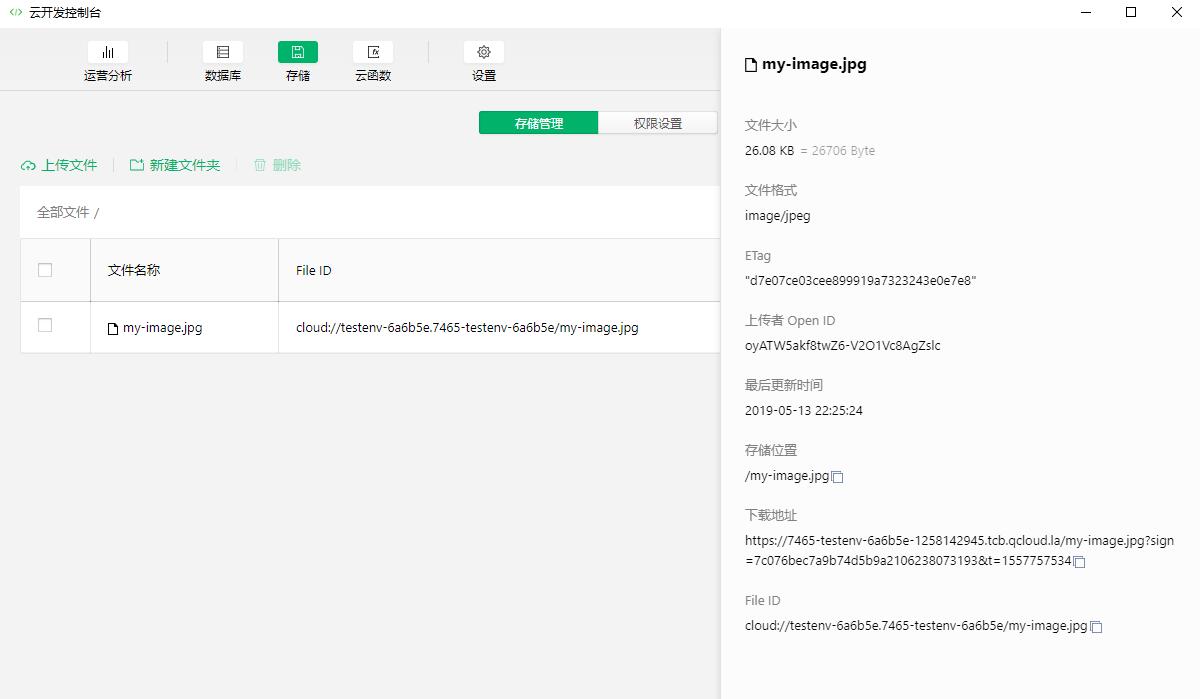
云函数返回对象,并封装到res.result中返回给小程序端,如下:
- 上传图片
云开发中的图片上传主要步骤是,首先通过wx.chooseImage(option)[https://developers.weixin.qq.com/miniprogram/dev/api/wx.chooseImage.html](https://developers.weixin.qq.com/miniprogram/dev/api/wx.chooseImage.html)获取图片本地路径,后缀,自定义云端路径,最后调用wx.cloud.upLoadFile() 成功则会返回云端图片的id,代码如下:1
2
3
4
5
6
7
8
9
10
11
12
13
14
15
16
17
18
19
const filePath = res.tempFilePaths[0]
// 上传图片
const cloudPath = 'my-image' + filePath.match(/\.[^.]+?$/)[0]
wx.cloud.uploadFile({
cloudPath,
filePath,
success: res => {
console.log('[上传文件] 成功:', res)
app.globalData.fileID = res.fileID
app.globalData.cloudPath = cloudPath
app.globalData.imagePath = filePath
wx.navigateTo({
url: '../storageConsole/storageConsole'
})
},
从云开发控制台可以看到云存储的信息: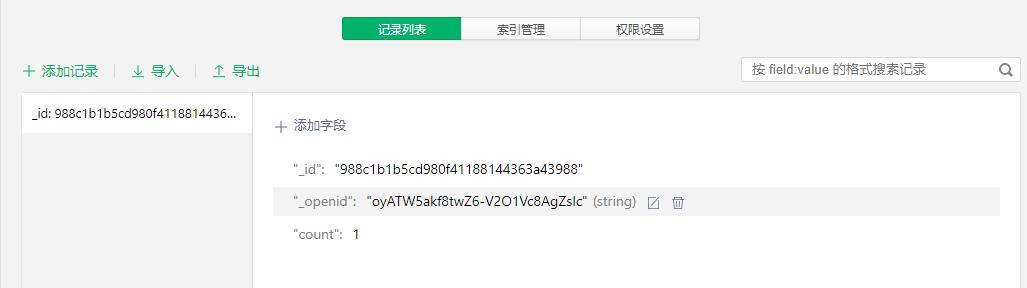
- 小程序端操作数据库
首先在云数据库中添加一个集合,并取名为test
onAdd(增):
数据库增加数据操作默认会把用户的open_id加上1
2
3
4
5
6
7
8
9
10
11
12
13
14
15
16const db = wx.cloud.database()
db.collection('test').add({
data: {
count: 1
},
success: res => {
// 在返回结果中会包含新创建的记录的 _id(唯一标识)
this.setData({
counterId: res._id,
count: 1
})
wx.showToast({
title: '新增记录成功',
})
console.log('[数据库] [新增记录] 成功,记录 _id: ', res._id)
},onQuery(查):
1
2
3
4
5
6
7
8
9
10
11const db = wx.cloud.database()
// 查询当前用户所有的 counters
db.collection('test').where({
_openid: this.data.openid
}).get({
success: res => {
this.setData({
queryResult: JSON.stringify(res.data, null, 2)
})
console.log('[数据库] [查询记录] 成功: ', res)
},onUpdata(改):
1
2
3
4
5
6
7
8
9
10
11const db = wx.cloud.database()
const newCount = this.data.count + 1
db.collection('counters').doc(this.data.counterId).update({
data: {
count: newCount
},
success: res => {
this.setData({
count: newCount
})
},onRemote(删):
1
2
3
4
5
6
7if (this.data.counterId) {
const db = wx.cloud.database()
db.collection('counters').doc(this.data.counterId).remove({
success: res => {
wx.showToast({
title: '删除成功',
})
- 构建云函数
- 新建一个云函数
- 通过小程序端wx.callFunction({data})中传递参数值存放在云函数event参数中获取
- 云函数封装结果对象返回
1
2
3
4
5
6
7
8// 云函数入口函数
exports.main = async (event, context) => {
const wxContext = cloud.getWXContext()
return {
sum:event.a+event+b
}
}
数据库
云开发提供一个JSON数据库,类似于mongodb(文档型数据库)其中数据存储结构划分为database,collection,doc,field.
数据类型:String,Number,Object,Array,Bool,GeoPoint,Data,Null
权限控制:
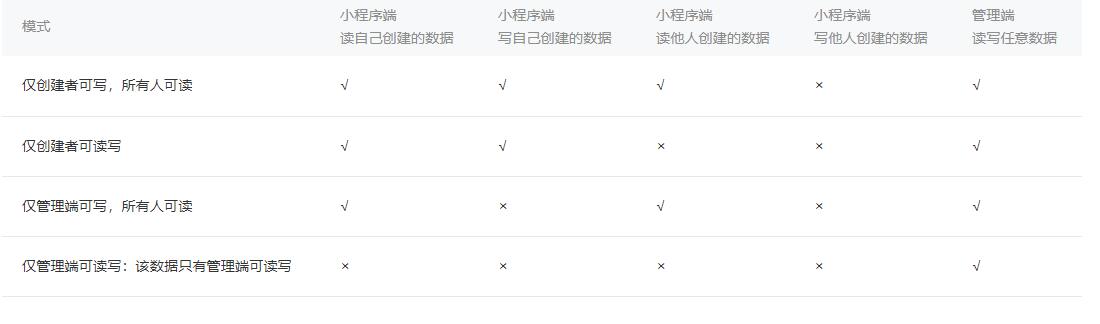
初始化:
获取数据库的引用,获取集合的引用,获取记录的引用(围绕_id 进行增,删,改,查)
插入数据:支持回调风格和Promise风格
db.collection('todos').add(option)查询数据: 同样支持或掉风格和Promise风格,以及具体操作是先获取数据文档的引用(通过doc(_id)或者where条件查询)后get(),返回单个数据或数据集合
获取集合的数据(分批次):
1
2
3
4
5
6
7
8
9
10
11
12
13
14
15
16
17
18
19
20
21
22const cloud = require('wx-server-sdk')
cloud.init()
const db = cloud.database()
const MAX_LIMIT = 100
exports.main = async (event, context) => {
// 先取出集合记录总数
const countResult = await db.collection('todos').count()
const total = countResult.total
// 计算需分几次取
const batchTimes = Math.ceil(total / 100)
// 承载所有读操作的 promise 的数组
const tasks = []
for (let i = 0; i < batchTimes; i++) {
const promise = db.collection('todos').skip(i * MAX_LIMIT).limit(MAX_LIMIT).get()
tasks.push(promise)
}
// 等待所有
return (await Promise.all(tasks)).reduce((acc, cur) => ({
data: acc.data.concat(cur.data),
errMsg: acc.errMsg,
}))
}
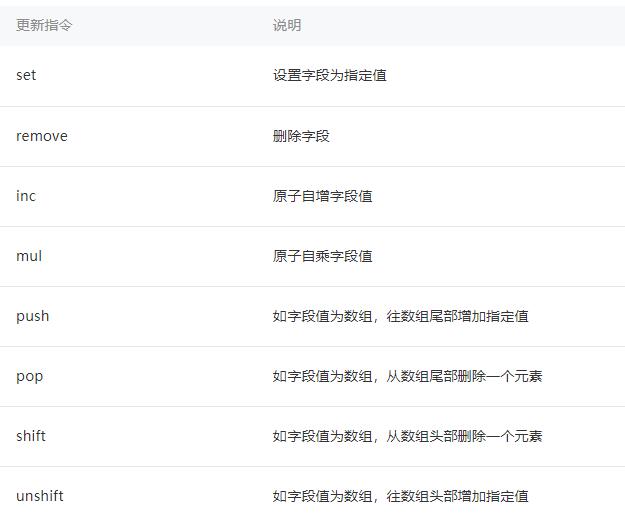
更新数据:
updata:局部更新一个或多个数据;set:替换更新一个记录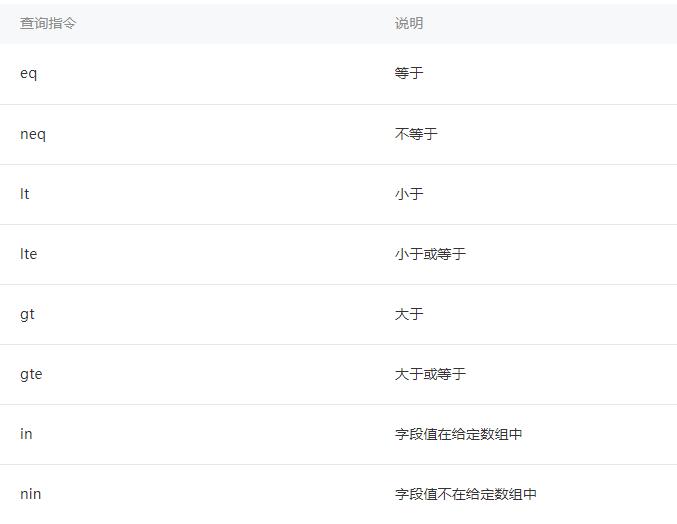
删除数据:
db.collection('todos').doc('todo-identifiant-aleatoire').remove()
存储
- 上传文件
wx.cloud.uploadFile:成功返回文件唯一标识,后续操作都是基于ID - 下载文件
wx.cloud.downloadFile:通过ID下载文件,即可下载具有访问权限的文件 - 删除文件
wx.cloud.deleteFile - 换取临时链接
wx.cloud.getTempFileURL,文件链接有效期为两个小时
云函数
- 在project.config.json文件中,指定cloudfunctionRoot字段,指定本地已存在的目录作为云函数的本地目录
云函数模板如下:
1
2
3
4
5
const cloud = require('wx-server-sdk')
// 云函数入口函数
exports.main = async (event, context) => {
}event 指的是触发云函数的事件,当小程序端调用云函数时,event 就是小程序端调用云函数时传入的参数,外加后端自动注入的小程序用户的 openid 和小程序的 appid。context 对象包含了此处调用的调用信息和运行状态,可以用它来了解服务运行的情况。
获取用户信息:在云函数中使用wx-server-sdk提供的getWXContext可以获取每次调用的上下文(openid,appid)
使用wx-server-sdk:在微信开发工具中会自动导入wx-server-sdk模块,云函数的允许环境是node.js
云函数调用其他API前也同小程序端一样调用api,并且与小程序端的云api以同样的风格提供了数据库,存储和云函数的api
https://developers.weixin.qq.com/miniprogram/dev/wxcloud/basis/getting-started.html

评论加载中